Skip to content

Automation / Operations

How to Find the Right Business Process to Automate First

A practical framework for choosing which workflow to automate first based on repetition, volume, handoffs, risk, and operational value

/ 8 min read

Businesses often start with the wrong question. They ask, "Where can we use AI?" when the more useful question is, "Which workflow is creating unnecessary friction right now?"

That distinction matters because automation should solve an operational problem, not exist just because the technology is available. The best first automation is usually not the most ambitious one or the most impressive demo. It is the process that repeats constantly, slows the team down, and is clear enough to improve without guesswork.

If you choose that first workflow well, automation becomes easier to trust, easier to measure, and easier to expand later. If you choose badly, the project often turns into complexity before it creates value.
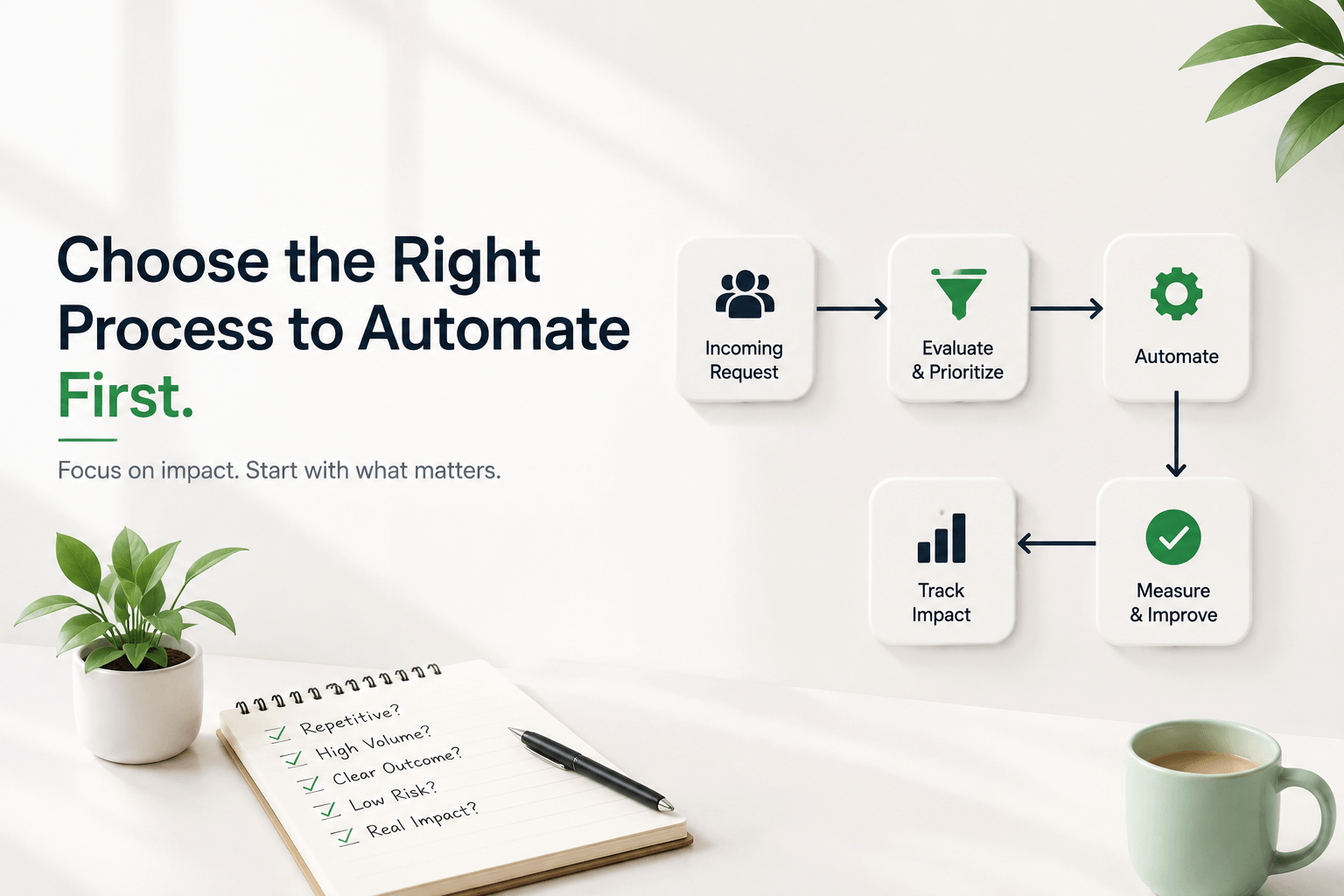
Business workflow automation planning and prioritization

Start With Repetition

Repeated work is usually the easiest place to find automation opportunities. If your team is copying information between systems, answering the same questions, sending routine follow-ups, updating CRM records, creating internal tasks, coordinating schedules, or checking status repeatedly, there is probably a workflow worth examining.

But repetition by itself is not enough. A task can happen often and still be a poor automation candidate if it changes shape every time or depends on judgment that has never been clearly defined. Repetition is the starting clue, not the final decision.

The reason repetition matters is simple: repeated manual work tends to create drag. It steals attention, introduces inconsistency, and makes teams spend energy on steps that should already be easier. When people say operations feel heavier than they should, repeated low-value tasks are often part of the problem.

Look at Volume and Frequency

A small task becomes expensive when it happens often enough. A three-minute task once a month is rarely the first thing to automate. A three-minute task fifty times a day is another story.

The logic here is straightforward. High-frequency work compounds. Even if each instance seems minor, the total interruption, context switching, and repeated handling start to add up. That is why one of the best ways to choose a first automation is to look for tasks that happen constantly rather than tasks that only feel important when they appear.

Volume also creates consistency in the input. When a workflow happens often, you usually get a clearer picture of what the common path looks like, which makes it easier to design automation around the real pattern instead of the rare exception.

Find the Handoffs

Many workflows feel slow not because the work itself is difficult, but because information keeps moving manually between people and systems.

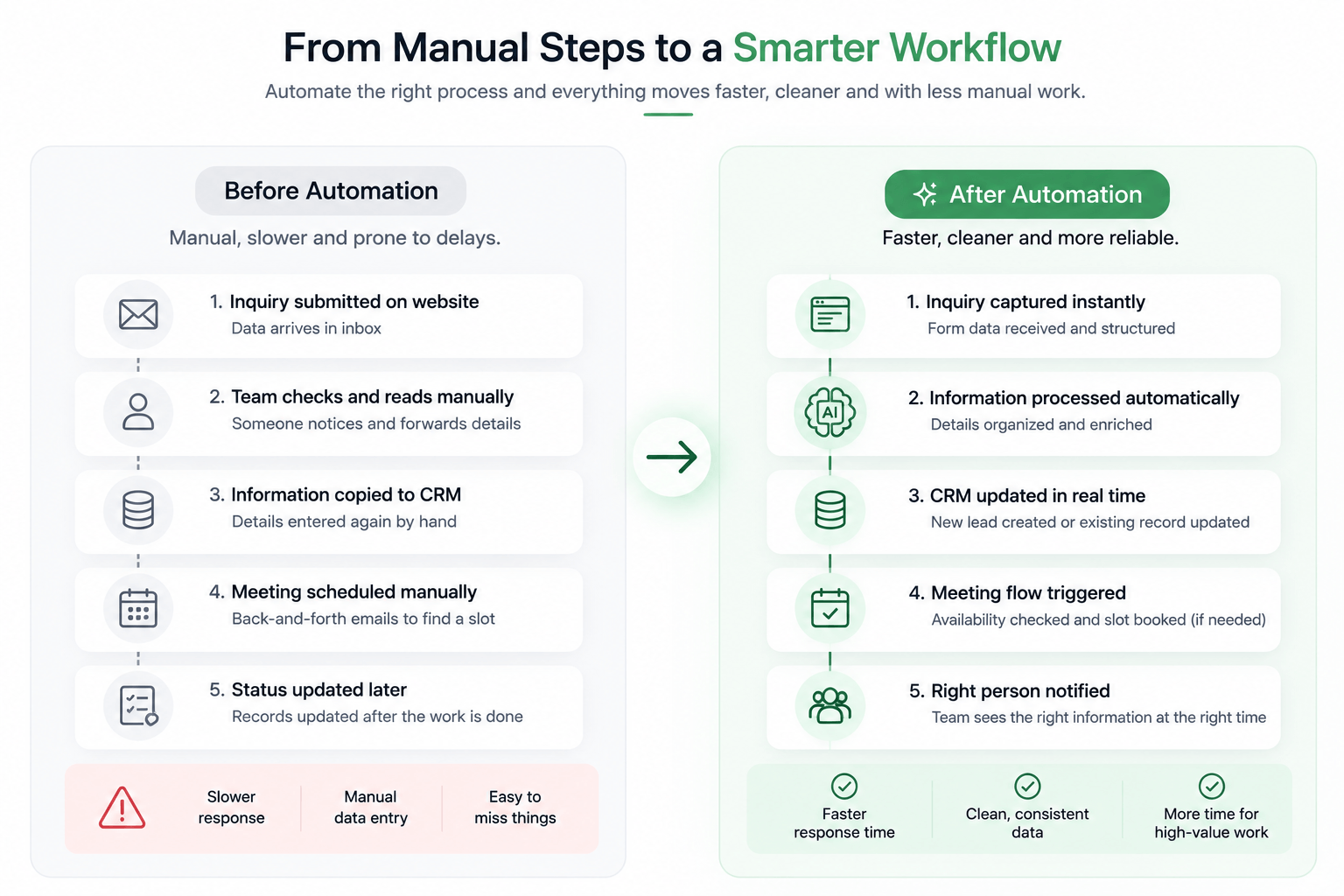
A website inquiry comes in. Sales sees it later. Someone copies the details into the CRM. A meeting has to be scheduled. Operations needs the context. Every handoff creates an opportunity for delay, duplicated entry, or something getting missed.

That is why handoffs are such a useful place to look. When information should already be flowing from one step to the next but still depends on a person noticing, forwarding, retyping, or summarizing it, the workflow is often a strong automation candidate.

A good first automation does not need to remove humans from the process. It often just removes unnecessary manual movement between steps so the right person sees the right information sooner and in a cleaner form.

Look for Waiting, Not Just Work

Businesses usually notice manual effort first, but waiting time is often the bigger operational problem.

Sometimes the issue is not that a task takes long to complete. It is that nobody notices the form quickly, nobody replies until later, nobody updates the record right away, nobody schedules the next step, or nobody forwards the relevant context when it matters. The time lost between actions can be more damaging than the actions themselves.

That is why a good automation can improve responsiveness even when the underlying task is not especially difficult. A workflow that captures an inquiry immediately, updates the relevant system, and alerts the right person only when useful can remove unnecessary waiting without pretending every step should be fully automated.

This is especially relevant for service businesses, sourcing teams, clinics, real estate teams, and e-commerce operations where speed of response affects whether a lead, request, or issue moves forward at all.

Ask Whether the Process Is Clear Enough

Automating a broken or unclear process usually makes the problem harder to see, not easier to solve.

Before automating anything, ask a few plain questions. What starts the workflow? What information is required? What decision has to happen? What action follows? What exceptions exist? When should a human step in?

If nobody can answer those questions clearly, the issue may not be automation yet. The issue may be process design. That is an important distinction because unclear workflows tend to create brittle systems. Instead of reducing friction, they turn hidden confusion into automated confusion.

This is also the point where businesses should think about whether a workflow needs strict rules or a more flexible interpretation layer. If that distinction is not obvious, our article on when to use an AI agent instead of traditional automation is a useful companion.

Score the Workflow

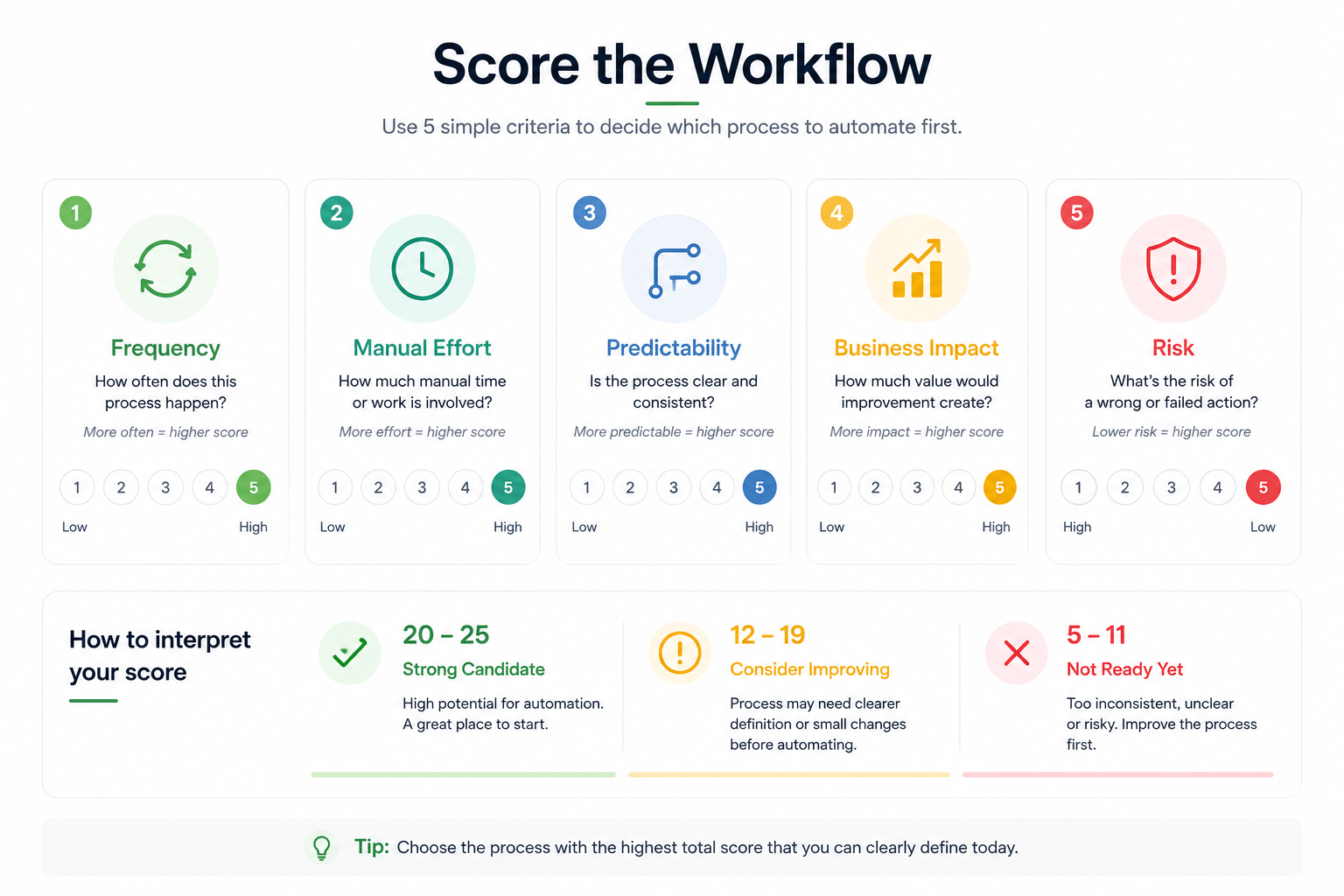
A simple scoring model can stop the decision from becoming vague or overly theoretical.

CriteriaStrong Candidate SignalWeak Candidate Signal

Frequency

Happens often enough to matter every week

Only happens occasionally

Manual effort

Requires repeated copying, checking, updating, or follow-up

Barely takes any time or attention

Predictability

The steps are known and the required inputs are clear

The process changes every time

Business impact

Delays or inconsistency affect leads, clients, or operations

The outcome has little operational value

Risk

Errors are recoverable and review is manageable

Mistakes are costly, sensitive, or hard to reverse

High frequency, high manual effort, reasonable predictability, real business impact, and low to moderate risk usually point to a strong first automation candidate.

Low frequency, unclear process, limited operational value, and high risk usually point in the opposite direction. That kind of workflow may still matter, but it is rarely the first place to start.

Framework for scoring which business process should be automated first
A useful first automation candidate tends to be frequent, manual, predictable enough to define, and low enough risk to improve safely.

Good First Automation Candidates

There is no universal first workflow for every company, but some patterns appear often because they are repeated, operationally useful, and structured enough to improve safely.

Lead Intake

Capture an inquiry, structure the details, create or update the CRM record, and route it to the right person.

Appointment Scheduling

Check availability, confirm a slot, create the meeting, and send the right confirmation.

Internal Notifications

Trigger useful alerts when something meaningful happens instead of relying on someone to notice it later.

CRM Administration

Update records, summarize conversations, and move structured data without repeated manual entry.

Repetitive Follow-Up

Automate reminders or check-ins only when the timing and rules are clear enough to avoid noisy outreach.

Status / Information Requests

Retrieve routine information from approved sources and answer common questions faster.

These are not universal prescriptions. They are simply common examples of workflows where a business can often reduce unnecessary admin, handoffs, or response delays without trying to automate everything at once.

If your workflow includes CRM updates or scheduling logic across tools, the existing article on how AI agents work with CRM, calendars and business tools may also help clarify what a connected implementation looks like.

Processes You Should Be Careful Automating First

Balance matters here. Some workflows should not be your first automation project even if they are painful.

  • high-risk financial decisions
  • sensitive HR decisions
  • legal or compliance decisions
  • workflows with many undefined exceptions
  • processes where wrong actions are difficult to reverse

These areas may still use automation, but they usually need tighter rules, stronger validation, or human review from the start. That makes them a weaker first project for most teams that are still trying to prove what a reliable automation approach looks like inside their business.

Choose One Workflow, Not Ten

A common failure mode is trying to automate the whole company in one go. The plan sounds ambitious, but the result is often vague scope, too many moving parts, and no clear signal about what is actually working.

A better approach is simpler: choose one workflow, define what success means, implement it, test it, observe how it behaves, improve it, and expand later. That gives the team something concrete to learn from instead of turning the first project into a broad transformation program.

The first automation should create clarity as much as efficiency. It should show how the business wants workflows to behave, where humans still need visibility, and what kind of automation architecture fits the operation best.

A Simple Example

A service company receiving website inquiries is a good example of a workflow that often hides in plain sight.

Current Process

  1. 1. Form submitted
  2. 2. Someone checks the inbox
  3. 3. Details are copied into the CRM
  4. 4. A reply is written
  5. 5. A call is scheduled
  6. 6. Status is updated manually

Improved Workflow

  1. 1. Inquiry is captured immediately
  2. 2. Relevant data is structured
  3. 3. The CRM is updated
  4. 4. The right response or handoff is prepared
  5. 5. Meeting flow is triggered if needed
  6. 6. The team is notified only when useful

This is usually a better first automation project than trying to build a broad "AI assistant for everything." The workflow is easy to understand, the friction is visible, the handoffs are real, and the operational value is easy to explain.

It also creates a strong foundation for later improvements. Once intake, routing, and follow-up are cleaner, the business can decide whether to add more deterministic workflow logic, a knowledge layer, or an AI agent where interpretation genuinely helps.

Manual business workflow compared with an automated workflow
The strongest first automation often replaces manual handoffs with a cleaner, more reliable workflow.

How Izenth AI Approaches First Automation Projects

Izenth AI starts with the workflow itself. The first question is not which tool looks impressive. It is what is happening operationally today, where the friction sits, what decisions are required, and which parts should stay deterministic.

From there, the right combination can be chosen: structured automation, AI agents where interpretation is genuinely useful, integrations between systems, knowledge access where approved information matters, and human handoff where accountability or exceptions require it.

If you want a broader view of how these projects are scoped, the Process page gives a clearer picture of how workflow discovery and implementation are approached.

Closing

The best first automation is often hiding in plain sight. It is the task your team repeats constantly, the handoff that keeps slowing things down, or the process everyone already knows should be easier.

You do not need to start with the biggest possible system. You need to start with the workflow that is frequent, clear enough to improve, and valuable enough to matter once it works reliably.

If you want to explore where that might be in your own operation, review our Practical Demos, look through our Services, or start a conversation.